Tools Toys and Technology

About the Tools You Use and the Toys That Make Life Interesting

Tools Toys and Technology - About the Tools You Use and the Toys That Make Life Interesting

Roku gets PBS channel

If you’ve been following my Internet TV articles and posts, you know that of all the devices that can play streaming TV on your living room set, my personal preference is Roku. Actually that’s an understatement. In my humble opinion, it has no competition for its diversity in free and paid programming.

They’ve just given me one more reason to say that … PBS. This last week, the PBS channel was added to the extensive Roku channel list. That brings programming such as Antiques Roadshow, Great Performances, History Detectives, Masterpiece, Nature, and the venerable Nova to your streaming entertainment menu. And there’s much more besides that.

If you have a Roku, be sure to add this channel to your My Channels list. If you don’t have Roku, check out the Roku page here and read about the latest Roku 3.

Laissez les bons temps rouler! Computer Curmudgeon 2/2010


Mardi Gras, where the good times roll freely, is February 16 this year. Experienced New Orleans visitors quickly become familiar with the Cajun version of Carnival and the custom of lagniappe – the “little something extra” like the trinkets tossed to the crowds attending the parades or the extra beignet tucked in your bag at the bakery.

A little internet searching will provide you with a bounty of lagniappe in the form of abundant free, useful software from a wide variety of sources. A simple Google search for “free software” yields 265,000,000 matches. The sources below are ones I regard as reliable and which I use and recommend frequently. Continue reading

Retiring an Old Computer? Computer Curmudgeon 12/2009

If you find a new computer under your Christmas tree, just what do you do with the former occupant of your desk?

Many households find that one computer per person effectively provides convenience and avoids conflicts over usage. A surprising number of families have both a desktop and a laptop computer. You may simply continue to use your old computer – as a standby system, as a test platform, as a “loaner” for guests, as a dedicated workstation for record keeping or a multitude of other purposes.  This may be a prime time to speed up that old PC by cleaning out old or unnecessary programs, cleaning up and defragmenting the hard drive as a thorough tune up can often restore a satisfying level of improvement to an aging system. For some basic information see “Optimize  Your PC” at www.microsoft.com/athome/setup/optimize.aspx Continue reading

Are You a Mac or a PC ? Computer Curmudgeon 11/09

In some circles, this question will launch a spirited discussion which may occasionally progress to fisticuffs. In other settings, observers may wonder just what sort of mental derangement makes people think they are electronic devices.  This question is regularly posed as part of a long series of attention seeking advertisements painstakingly crafted by TBWA Chiat Day of Los Angeles for Apple. Continue reading

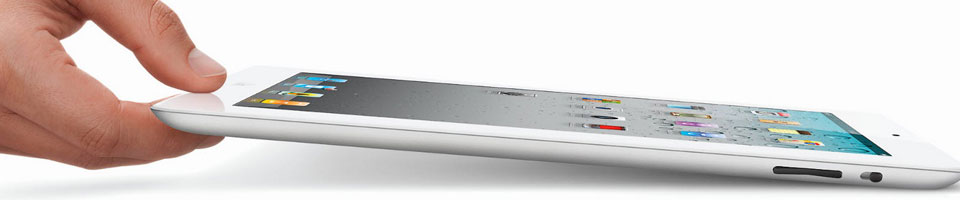
Tablet PC = Streaming TV Receiver

I’ve talked about a number of streaming TV receivers in the past: Roku (my favorite by far), smart TVs (with streaming built-in), game consoles, Blu-ray players.

But there is another one that I’ve neglected to mention. It’s obvious, really, but I just never thought of it before.

If you have a Tablet PC, you have a streaming TV receiver

When I refer to “tablet PC” I’m speaking in the generic sense. I include every tablet I know of, whether it’s Android, iPad, Windows RT or Windows 8. They all have apps for Netflix, Hulu Plus and other streaming TV sources. If you have one of these devices, then all you need to enjoy streaming programs on your living room big screen is an HDMI adapter for your tablet. Then connect your tablet to an HDMI input for your TV, and there you have it. You can watch anything that Netflix or any other streaming app offers in all its 60-inch widescreen glory.

How does this differ from connecting a laptop to your TV?

I have discussed connecting a laptop to a TV before. Connecting your tablet to your TV via HDMI is just a special case of connecting any computer to your TV. Hardware-wise that’s true. But programming-wise, it may not be. You may have some streaming sources available to you as tablet apps that will not function on a computer.

It’s also a little neater from a footprint sense to sit a tablet by your TV, as opposed to a laptop or, heaven forbid, a desktop.

What do you need?

HDMI adapter for Galaxy Tab 2

Well, first you need your favorite tablet. Then you need a means of connecting it to HDMI.

I bought an adapter for my Samsung Galaxy Tab 2 10.1; and I know iPad has one. There are so many tablet options these days, you’ll have to check your specific manufacturer. But, probably most if not all current tablets have some kind of HDMI capability.

So, chalk up one more application for these marvelously versatile devices.
Just How Old is “Too Old” ? Computer Curmudgeon 9/2009

When the SaddleBrooke Computer Club Board of Directors convened for our monthly business meeting, I was innocently seated in the rearmost chair. As our discussion turned to a proposal that we provide a monthly contribution for publication in the Saddlebag Notes, all heads quickly nodded in agreement to the notion that this would be a fine idea.

When the question arose as to who would be a likely author, all heads turned in unison in my direction. I’m still trying to decide if this is part of a plot to encourage my absence at further meetings – or not.

So, I’ll give this a shot. Computers have been a hobby and a diversion for me, not a profession. I hope this will turn out to be both useful and entertaining. Most of the material will be from me, with some help by other members.

Continue reading

How the Curmudgeon got started

The Computer Curmudgeon column first appeared in September of 2009 in response to a request from the editor of SaddleBag Notes for a monthly computer related commentary.

While I’ve been using computers since the Commodore 64 was the hot new computer (1982 !), this is my first excursion to publishing online. It’s a delight to have Richard to all the heavy lifting done with this blog before I was invited to join the party.

Once I get more familiar with the idiosyncrasies of WordPress, I will be posting the older columns in sequence. Once all of these are accounted for, additions to this section of Tools, Toys and Technology will appear about a month after the have appeared in the SaddleBag Notes. Time permitting; I hope to have some additional items to share here.